Apex Legends Gave Me a Voice Without a Microphone
Apex Legends accessibility features—voice-to-text, text-to-speech, and ping—make squad communication clearer for every player.
I still remember the first time I dropped into King's Canyon. It was February 2019, Apex Legends had just surprise-launched, and I was skeptical. Battle royale games had burned me before: no subtitles, no chat-to-text, and a whole lot of yelling I could not follow. I figured Apex would be more of the same. Color me wrong.
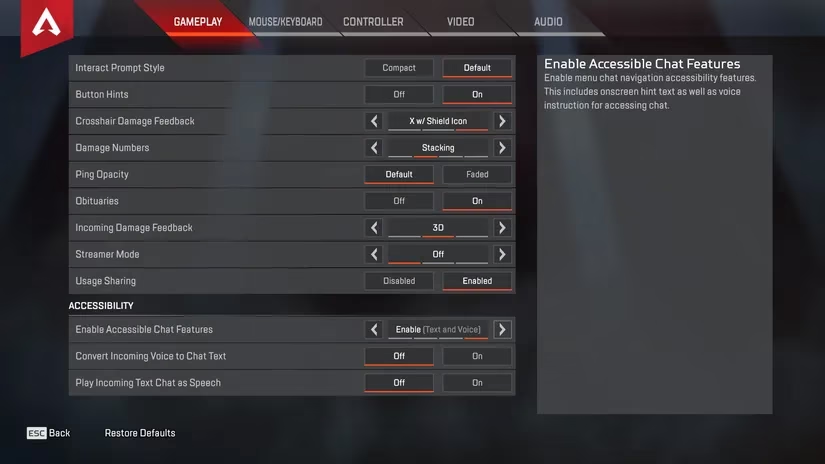
I opened the Settings menu expecting the usual bare-bones options. Instead, the Gameplay tab greeted me with three Accessibility settings tucked at the bottom. The first one, Enable Accessible Chat Features, let me choose off, text, voice, or both. That meant on-screen hint text and voice instructions for accessing chat. For someone who has spent years squinting at tiny chat boxes while a firefight kicks off, that was a game-changer. I am not exaggerating when I say I felt seen.
Then I found the real magic: an option to convert incoming voice communications to text. Live subtitles for my squad. On the flip side, text chat could be converted into speech. I have never been a mic-first player. My ears work overtime, my brain lags, and by the time I call out an enemy, the fight is already over. Apex gave me a way to stay in the loop without pretending to be something I am not. No cap, that is huge.
Here is a quick breakdown of what I found useful back then, and what still matters in 2026:
| Feature | What it does | Why it matters |
|---|---|---|
| Accessible Chat Features | Toggles text, voice, or both for chat hints | Keeps communication clear for different needs |
| Voice-to-Text | Turns squad voice chat into live subtitles | Lets deaf and hard-of-hearing players follow calls |
| Text-to-Speech | Reads text chat aloud | Helps players who rely on audio directions |
| Colorblind Settings | Protanopia, Deuteranopia, and Tritanopia modes | Makes enemy outlines and loot easier to read |
| Ping System | One-button callouts for items, directions, and enemies | Communication without a microphone |
Seven years later, in 2026, I reinstalled Apex Legends on a whim. The game is still free on PC and consoles, still loud, still chaotic, and still full of players who treat every match like the final circle at a tournament. But the same spirit of accessibility is baked into the experience. The ping system alone has become second nature to me. I can point at a purple armor, mark a rotating squad, or warn my team about a third party without saying a word. It is not just a convenience; it is a bridge.
I have teamed up with chatty players who use voice-to-text and text-to-speech like old pros. One teammate typed a joke mid-match, the game read it aloud in that slightly robotic voice, and the whole squad cracked up. It was silly, but it was also proof that accessibility features do not have to be dry or clinical. They can be part of the fun.
I will be honest: not every match is a smooth ride. Random squads can be toxic, and some players still ignore pings. But when accessibility works, it really works. Apex Legends was not the first game to try subtitles or colorblind modes, but it was one of the first battle royale titles to treat communication as a design problem worth solving. That matters in a genre where teamwork is everything and a single missed call can send you back to the lobby.
In 2026, I am older, slower, and somehow even worse at aiming. But I still load into Apex because it lets me play my way. I can use live subtitles, ping like a madman, and never once feel like the odd one out. That is more than a feature list. That is respect. And for a free-to-play shooter that launched in a whirlwind, it is pretty darn impressive.
So if you see me in the dropship, do not expect a mic check. Expect a flurry of pings, a few badly timed jokes in text chat, and a squadmate who is just happy to be included. Squad up, legends. Let us call it a night.
Comments